


Encrypted backup app for your data protection
Create independent backups of your files
Protect your files Windows
 MacOS
MacOS
 Android
 Linux
Linux
Upgrade to Pro for more storage and features
Basic account
Free
20GB storage a month
Store and share documents
Convert docs to PDF
Antivirus protection
You’ll Save 24$
PRO
$7,9 /month
$9,9 /month
118,8$ 94,80$ yearly
Up to 3× faster uploads
2 TB scalable storage
Files up to 50 GB
Ad-free sharing
Password and link expiration date
Recover deleted files for 30 days
Receiving files from clients
Galleries and photo selection
Backup and synchronization
AI faces, text and automatic tags
You’ll Save 72$
TEAM
$19 /month
$25 /month + VAT
300$ 228$ + VAT yearly
4 users, including 1 administrator
2 TB shared space
Organization account with details
PRO features for the whole team
Files remain with the organization
Manage users and access
File size up to 200 GB
Notifications when a file is opened
Users and space can be added
You’ll Save 312$
BUSINESS
$99 /month
$125 /month + VAT
1500$ 1188$ + VAT yearly
10 users included
5 TB shared space
You can start with 1 user and 1 TB
File size up to 400 GB
Postpaid invoice
File versions up to 1 year
File restoration up to 5 years
User group management
Full activity history
All TEAM features
Mandatory 2FA for the entire team
Business support

How to create backup copies?
How to create backup copies?
With Files.fm Sync, Backup or Duplicati you can automatically back up files from your device to a remote cloud storage or Webdav server.
For backups, create a separate user that synchronizes or backs up the entire contents of a folder to a specific target server.
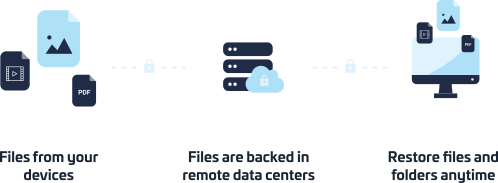
3-2-1 Backup strategy for important data: 3 copies
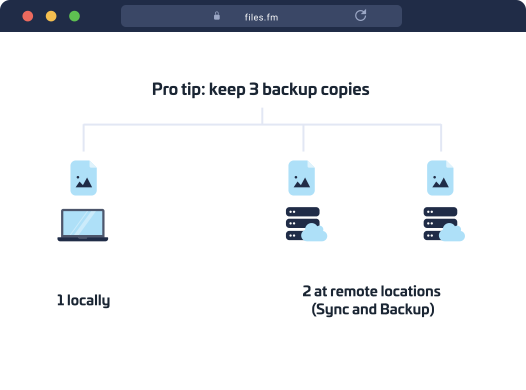
To achieve this, you can use different geographical data centers, backup virtual servers, or at least use multiple accounts. Contact us to implement.
Use both Files.fm Sync and Files.fm Backup or Duplicati programs on your computer or server to have various backup and restore options.
The safest thing is to use an individual virtual server, webdav server, use another program for backup copies, or an independent service provider!
The 3-2-1 universal backup recipe means keeping 1 copy on the primary server, 1 local copy of files in your infrastructure on your own media with Files.fm Sync and a third copy with Sync/Backup in parallel to a third server. This gives you 3 copies of files and a quick disaster recovery plan. Duplicati tool is mainly intended for IT administrators. To diversify the copies, we recommend creating separate Backup jobs for days, weeks, months, years. For example: "every day and keep the last 30 days" , "every week and keep the last 10 weeks", "every month and keep the last 12 months", "every year and keep the last 5 years" . This will help separate the copies, for safety and speed of the recovery process.
Duplicati backup tool features
Understandable interface
The tool has a simple and prudent management interface, available locally via web browser or through a network for administrator access.
Quick installation
By using an installation wizard and the default values, you can setup a full file backup in 10 minutes.
Easy to use for admin
An icon appears in your Desktop toolbar near your clock that informs you about the status of the backup, and lets you access the control panel.
Backup encryption
The tool uses the AES-256 encryption to protect your privacy and can utilize GnuPG to encrypt your file copies, before copying them to the server.
Incremental and recurring schedule
For each backup job, you can specify when and how often to make backups, how many versions to store and for how long to keep them on the server.
Data deduplication and compression
Tool efficiently uses data deduplication and compression to reduce the storage space and time needed for backups.
Protect your data = automatically create backups
Protect your data = automatically create backups
Every year, most businesses face data loss that can be catastrophic for the business. The reasons can be varied - cryptoviruses, hardware defects and wear and tear, user errors or deliberate malice, theft or loss of a device with all its data, lack of a disaster recovery plan.
The most common ways data is lost: human error, software errors, hardware crashes, fire, flood, theft, spillage, dropping the device.
Partners and tech


Files.fm 2016.09.12 has concluded an agreement No. SKV-L-2016/766 on participation in the EU programs “Growth and Employment”, “Increase the proportion of exports of high value-added products and services” and receiving co-financing in the measure “Promoting international competitiveness” under the funding framework of the European Commission. Identification No. SKV-P-2021/140.
 Files.fm — EU-based cloud storage